So you think disk cleanup is a chore? Think again. The minimalist design and thought-out interactions of DaisyDisk turn it into an easy and fun experience.
Apple’s App Store has honored DaisyDisk with the “Editors’ Choice” badge and periodically features the app in various editorial articles and app collections. DaisyDisk is a three times winner of the “Best of the Year” App Store award. Over 26,200 Apple and Pixar employees use DaisyDisk.
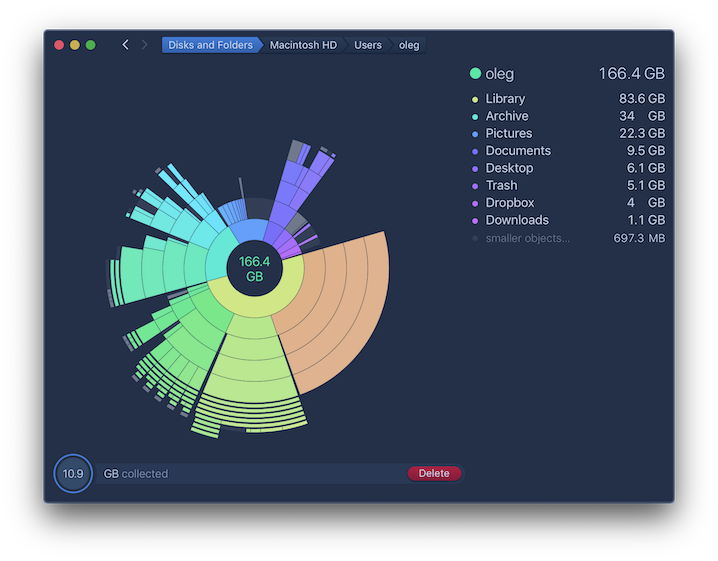
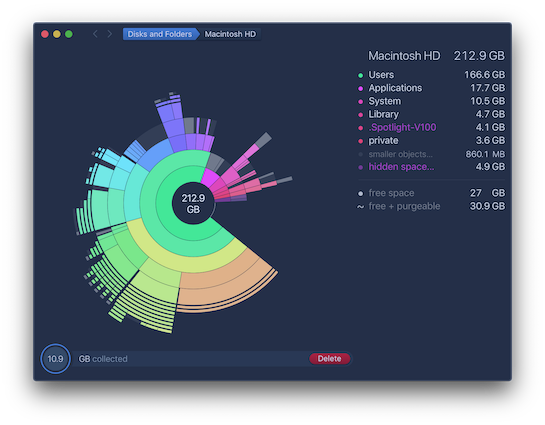
It happens to everyone sooner or later: after a few years of accumulating photos, videos, music, and other random documents, you start to get the dreaded notifications that you’re running out of room on your hard drive. DaisyDisk is meant to help — it scans your computer and shows you just how much storage you’re using, broken down by files and folders in neat, colorful rings that make it simple to dial down to the junk that’s taking up all your space and clear out your computer.
[…] DaisyDisk is my personal favorite for analyzing disk usage on the Mac. It’s a beautiful app. […]
DaisyDisk is still my favorite disk management tool for macOS.
[…] we recommend an easy-to-use utility called DaisyDisk. This app helps you easily find and remove unneeded files you may have forgotten about.
DaisyDisk is a beautiful disk space analyzer. It’s the preference of many Mac users. […] DaisyDisk is very fast and very pretty.
Deleting files and sorting out disk-space is one of those tasks most people dread, so I can definitely appreciate that DaisyDisk has tried making it as fun (and beautiful) as possible.
The new DaisyDisk 4 has a new, flatter design […], with bright colors, it’s able to scan drives up to 20 times as fast, and it consumes less memory when in use.
DaisyDisk, chosen by Apple as a Mac App Store *‘essential’*, provides a cleaner and more interactive circular interface for [visualizing Mac’s hard drive].
This awesome app provides detailed information on what’s taking up space on your Mac’s storage drive. […] For newer Macs with smaller SSDs, it’s an essential tool.
DaisyDisk is simply one of the best disk utilities for finding out how a hard drive’s space is being used.
While there are a few similar apps none of them even come close to matching the beautiful DaisyDisk interface.
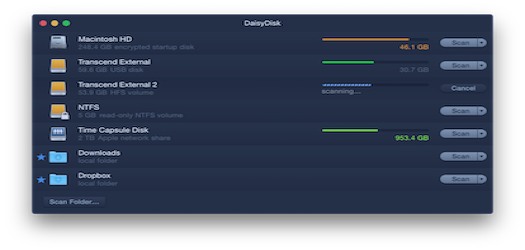
Internal or external, SSD or HDD, USB or Thunderbolt, local or network, physical or virtual, diverse file systems — you get them all. In addition, now you can connect cloud storage.
View all your connected disks and assess their capacity & free space in real time, even ahead of scanning.
Let’s face it. So called cleaner apps are insanely popular on the Mac. The idea that the system needs periodic cleaning appeals to many people. In reality, macOS can clean itself very well, and Apple actually discourages the use of cleaner apps.
When your disk space is low, fix the real problem — find and delete the large files that you no longer need.
DaisyDisk steadily tops the rankings of the most popular utilities in the App Store all over the world.
4.7
out of 5
★★★★★
★★★★
★★★
★★
★
3239
170
31
59
192
3691 ratings
2912 reviews
★★★★★Lucas Gonze —
Ridiculously good
One of those pieces of software that makes you hopeful. It does something important, has the right features, and is easy to understand. As a business they do not spam or annoy you, just wait for you to appreciate how much you’re getting and cough up some money, and the price they ask is very reasonable. The whole software industry should be as excellent.
★★★★★LongTimeUser3141 —
One of my all-time favorite apps
I don’t use it often, but when I need to, there’s nothing better.
★★★★★Rick6758 —
Restored my sanity
This app saved my sanity! Over 100GB of “system data” that I couldn’t make sense of. Somehow, it was the Podcasts app even though I didn’t download anything. Thank you DaisyDisk!
★★★★★Ahmad.Bar —
Amazing.
I’ve had this app for over 5 years and it’s the only way I clean my Mac. 10/10.
★★★★★JeffSaratoga —
Very well thought out tool, beautifully presented
As a professional programmer I have used many disk analysis tools over the years, but I have never seen one like this. Somebody put a lot of thought into how to best navigate the colossal amount of data on a typical disk these days. Very ingenious, very effective and programming beyond belief.
★★★★★Saksham Narvar —
Essential for mac
This is my first app purchased on mac, and i absolutely love it. It works flawless, just as intended for this type of app. No complaints. Unfortunately, this app is extremely important due to apple’s bloated macos, nevertheless, its an excellent app on its own.
★★★★★Random_Pro —
Simply the best!
Just saved 250GB of space! thank you to the Dev!
★★★★★AAClaw7 —
Super Convenient
I’ve been using this app for over a decade and it makes it ridiculously easy to find out what’s clogging up my harddrive so I can clear up space
★★★★★mjb5168 —
Easy to use and got the job done!
Helped me find 40GB worth of old iOS simulator cache files I no longer needed. Now I don’t have to fight with my Mac each time it needs more room to download an update!
★★★★★07_Cooper —
Makes Data Management a Breeze
This app was recommended to me by a Genius at the Apple Store when I was running low on disk space. I’ve used it regularly ever since to get a clear understanding of what is using my disk space, and more importantly, how to re-gain some.
★★★★★roguesecurity —
Frustration Saver
DaisyDisk has been frustration saver. I was struggling with low disk space on my Mac mini and the default storage tool on Mac was not showing the right picture. I was scratching my head to find a way to easily discover the culprit which is taking lot of space. Then I discovered DaisyDisk and really impressed with its UX and the ease with which I was able to locate the large files and folders to get rid of them and free up the space and make my Mac usable again. This is an amazing app!!! Kudos to the dev. Thank you :)
★★★★★PiotrFromPoznan —
It's great
It helps you quickly locate large folders and files and take a look what takes your disc space. The app is regulary updated. Highly recommended.
★★★★★Alpinwww —
Easy tool, one time payment
It let me find around 90 gb of data from apps that didn’t uninstall correctly and for $10 it was definitely worth it
★★★★★Andymortocks —
Can’t live without
Have used it for years, it’s one of the go to installers for any of my new Macs
★★★★★Andymortocks —
Can’t live without
Have used it for years, it’s one of the go to installers for any of my new Macs
DaisyDisk license is a one-time purchase, and not a subscription! With a single affordable payment, you get a lifetime license, without any recurring payments. Minor updates are included.
 DaisyDisk